Header: Puffco’s standard 3D and 3DXL chambers shown side by side.
Buying a replacement chamber should take less research than buying the whole rig. Puffco's names can make that harder than it sounds: Peak, Peak Pro, 3D, and 3DXL describe different things. The useful comparison starts with the base already on your desk, then moves to the chamber and its matching cap. If you are still choosing a Puffco device, our Puffco Pivot vs. Proxy comparison covers two other formats in the lineup.
For a Peak Pro owner, the decision involves price, compatibility, maintenance, and warranty coverage. Bigger hardware alone cannot tell you whether replacing a working part makes sense. Here is how to compare the standard Peak Pro 3D chamber with the 3DXL without turning a replacement purchase into a shopping spree.
Start with the device you actually own
Read the device name on your receipt or original packaging before opening an accessory cart. A listing that says “3D chamber” is incomplete information unless it also identifies the supported device. Puffco uses that technology name across multiple product families, so similar wording does not establish compatibility.
Puffco's current chamber collection lists the Peak 3D chamber separately from the Peak Pro 3D chamber. Proxy parts have their own listings too. That separation matters more than a retailer's shortened product title. Copy the full manufacturer name when asking a shop to confirm a replacement.
If you are still choosing the device itself, our Peak versus Peak Pro comparison covers that larger purchase. This guide assumes you already have a Peak Pro. Buying a chamber for the wrong base is an expensive way to discover that one missing word mattered.
What the listed prices actually compare
As checked on October 13, 2026, Puffco lists the Peak Pro 3D chamber at $75. Its Peak Pro 3DXL chamber is listed at $100. The difference is $25 before any applicable shipping, taxes, or promotions. Those are manufacturer list prices, not a promise of local stock or checkout totals.
Compare complete offers instead of treating the largest sale badge as the best deal. Check the exact chamber, included cap, seller, return terms, and delivery charge together. A cheaper listing with unclear contents leaves you doing another round of homework after paying. Save the product description alongside the order confirmation.
The arithmetic also changes when you already own a functioning chamber. Replacing a broken part creates a different decision from adding another working accessory. For a replacement, you are comparing two possible purchases. For an optional upgrade, compare the purchase against keeping the equipment that already meets your needs.
What changes with the 3DXL
Puffco describes the 3DXL as having a bowl 78% larger than its standard 3D chamber. The package includes the chamber and XL Joystick Cap; the Peak Pro itself is separate. The manufacturer specifies compatibility with all Peak Pro models and requires updated firmware. It also says the XL Joystick Cap fits only the 3DXL chamber.
Keep three compatibility checks together when comparing offers: the correct base, firmware version, and matching cap. A chamber photograph can establish appearance, but it cannot confirm what a particular seller includes. Read the written contents before assuming a cap shown in a lifestyle image comes with your order.
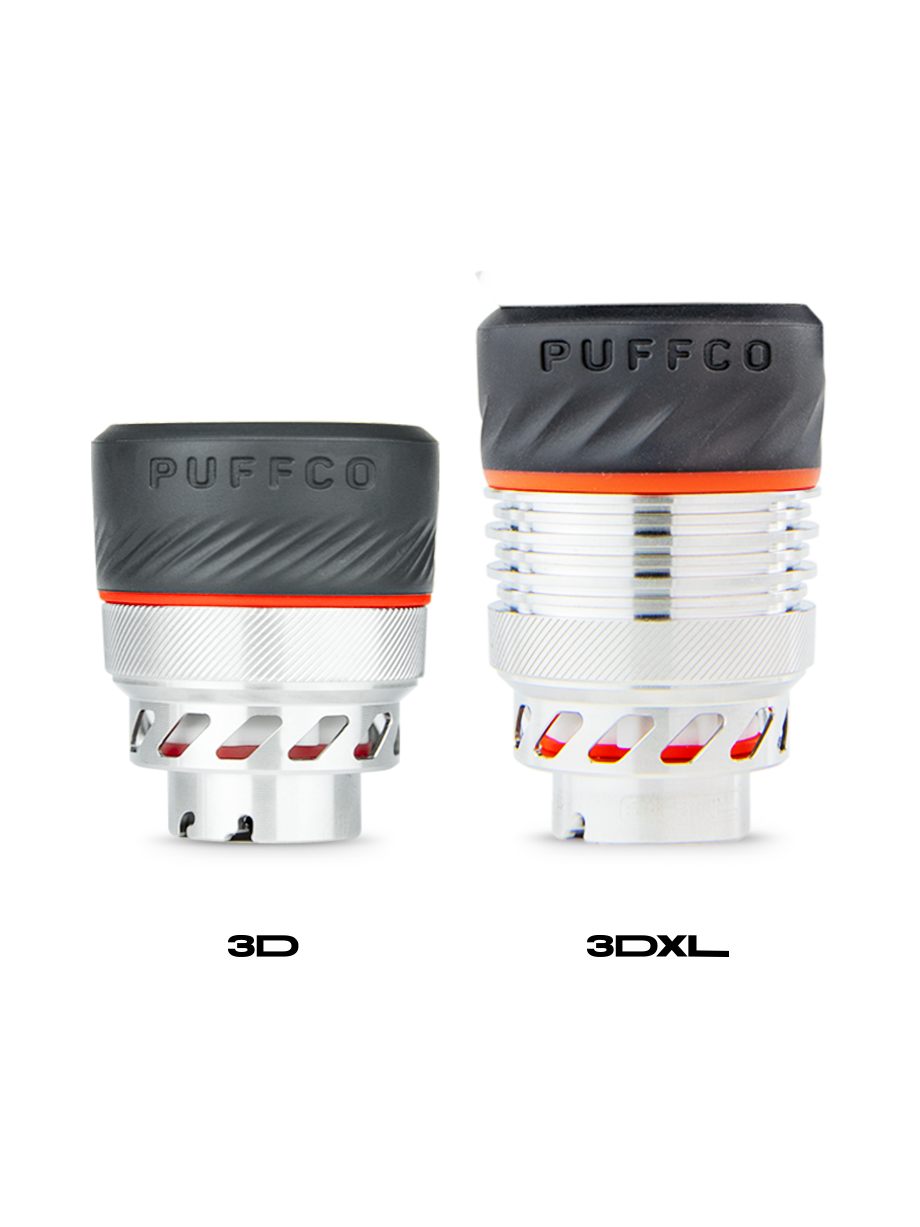
A capacity specification describes hardware dimensions without establishing how long your replacement will last in use. Treat the size you need and the longevity you hope for as separate ownership questions. If your current equipment is working, identify the specific limitation you want to address before giving the larger chamber automatic priority.
Check the software before blaming the hardware
Puffco's Peak Pro support page describes Standard, High, and Max Vapor Control settings for a connected 3D chamber. The XL setting becomes available with a connected 3DXL. That distinction explains why a photograph of someone else's app may show an option absent from your own setup.
Before buying another part to solve a missing setting, confirm your chamber model and firmware with support. Keep screenshots of the device information and any error message. Describe what happens and when it happens, rather than deciding the chamber is defective from a single symptom. Clear observations make a support request more useful.
Avoid changing several variables while trying to identify a problem. Replacing a cap, chamber, and unrelated accessory together can obscure what changed. Follow the manufacturer's troubleshooting order and keep a short record of the steps completed. Choosing a more expensive component cannot establish the cause of an unresolved connection issue with your rig.
Read the chamber warranty separately
Puffco's limited warranty policy lists one month for the Peak Pro 3D chamber and six months for the Peak Pro 3DXL chamber. These periods are specific to the components. Do not copy a device warranty headline onto an accessory purchase and assume the same coverage applies.
The policy contains conditions and exclusions, including restrictions concerning unauthorized sellers and secondhand purchases. Keep proof of purchase, the seller's identity, and the exact product name. If warranty coverage affects your decision, confirm the seller's status before checkout. A marketplace receipt alone should not substitute for reading the manufacturer's terms.
Warranty duration helps compare coverage, but it neither forecasts lifespan nor makes every problem eligible for replacement. Separate the purchase price, the stated coverage period, and the actual claim requirements in your comparison. That prevents a simple number from carrying more meaning than the policy supports.
Maintenance still belongs in the decision
Puffco directs Peak Pro owners to soak the chamber in 90% or stronger isopropyl alcohol for 20 minutes, never water. It also instructs owners to let the chamber dry completely before reattaching it. Consult the current support instructions for the exact component and keep cleaning liquid away from the powered base.
Do not transfer a glass-cleaning routine to an electronic chamber because both belong to the same rig. Our Peak product feature covers a different device in the same family, while the manufacturer remains the reference for component-specific care. Keep those jobs separate on the cleaning surface as well as in your head.
A spare chamber can offer scheduling flexibility during cleaning, but it also means another part to maintain. Before buying one, decide where clean and drying pieces will sit without getting mixed up. Save the instructions somewhere accessible. A useful accessory plan includes care and storage, not just the unboxing.
Three ownership situations worth separating
A working standard 3D chamber does not create an automatic reason to upgrade. If its size and supported settings suit your needs, keeping it is a defensible choice. Put the $100 purchase against a clearly named benefit you want. If you cannot name one, the larger option can wait.
A failed chamber calls for a different sequence. Check support and warranty eligibility first, then compare replacements if needed. At the listed prices, the 3DXL carries a $25 premium over the standard 3D. Evaluate that difference alongside its included cap and separate warranty period, without treating either as a guarantee.
A current kit buyer should check the package contents before buying extra accessories. Puffco's current Peak Pro product page lists a 3DXL chamber in the kit. Older inventory and retailer bundles deserve their own inspection. Do not add an upgrade merely because an older buying guide recommends it.
Keep the purchase tied to one problem
Write down the full device name, the chamber you own, and the reason for replacing it. Then compare compatibility, included parts, full order cost, and warranty coverage using the same questions. Add the care routine and available drying space before deciding whether either package fits your circumstances.
If your actual frustration concerns the overall device format, another chamber may not address it. Our Puffco Proxy versus Dr. Dabber XS comparison explores a different hardware decision. Keep that separate from routine Peak Pro maintenance, so a replacement part does not become an accidental device hunt.
The standard 3D and 3DXL are easiest to compare when the decision stays specific. Confirm compatibility, price the complete package, and read the component warranty. Buy for an identified need, keep the receipt, and save the care instructions. That is less exciting than an accessory haul, but considerably more useful.